In some cases, we are able to offer a Mobile Number Porting (MNP) option which would allow the transfer of a Japanese phone number.
However, the instructions / options available can vary depending on the specific product type.
For additional instructions, please refer to the relevant guide below -
Porting to Mobal:
Click here for more information
Important Note: If you have purchased a "Voice Lite" SIM / eSIM or the latest "Voice+Data 5G SIM Card" we offer (which was released on July 21st 2026), it will not be possible to transfer your current phone number to the Mobal SIM / eSIM. You will instead be assigned a new Japanese phone number once the SIM / eSIM is active.
If you are purchasing a new Mobal "Voice+Data 5G eSIM" (and already have a Japanese phone number from another service provider that you would like to transfer), simply follow the instructions below -
- Place an order for a Voice+Data eSIM directly from our website.
- Once you have received / collected your eSIM Access Code, login to your Mobal online account: www.mobal.com/myaccount
- Visit the "Services" section and then click on the "Activate" button found next to your Mobal eSIM.
- Enter the eSIM Access Code you received and the EID number for your device. On most handsets, you can locate the 32 digit EID number by dialing *#06# from the keypad (as mentioned here).
- Select the “Yes, I want to keep my existing phone number” option.
- You can then enter your current Japanese phone number, the MNP reservation code / MNP code expiry date (which you will be required to retrieve from your current service provider), your name and your date of birth.
- Once you have entered the required information, you can then click on the Continue button and follow the prompts to select your required plan etc.
Important Note: The option to transfer your phone number to a Mobal "Voice+Data 5G eSIM will only be available if you intend to select one of our ongoing plans.
Porting from Mobal:
Click here for more information
Important Note: If you're using a Voice Lite SIM/eSIM or the original version of our Voice+Data SIM Card (referred to as "V1" or "Version 1" in your account), it will not be possible to port out your number using the instructions below. Instead, please send an email to support@mobal.com with your request and your reason for porting. Our team should then be able to assist you further!
If you're using a "Voice+Data eSIM" or a later version of our "Voice+Data SIM Card" (and wish to transfer your number to a new service provider) however, you can follow the instructions below.
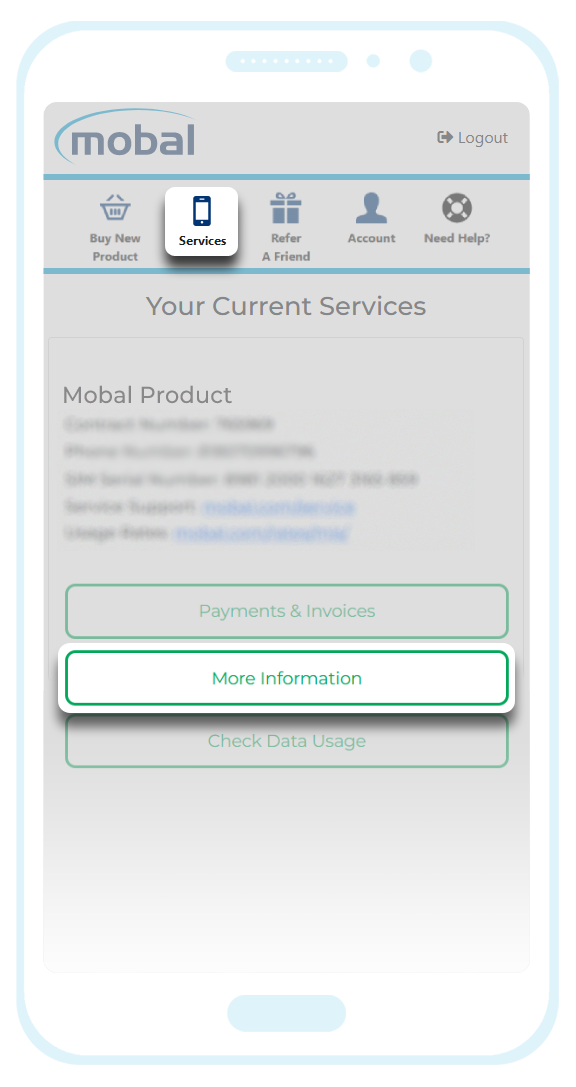
Once you have logged in to your Mobal account (MyAccount), please visit the "Services" section and then click on the "More Information" button found next to the relevant SIM / eSIM -
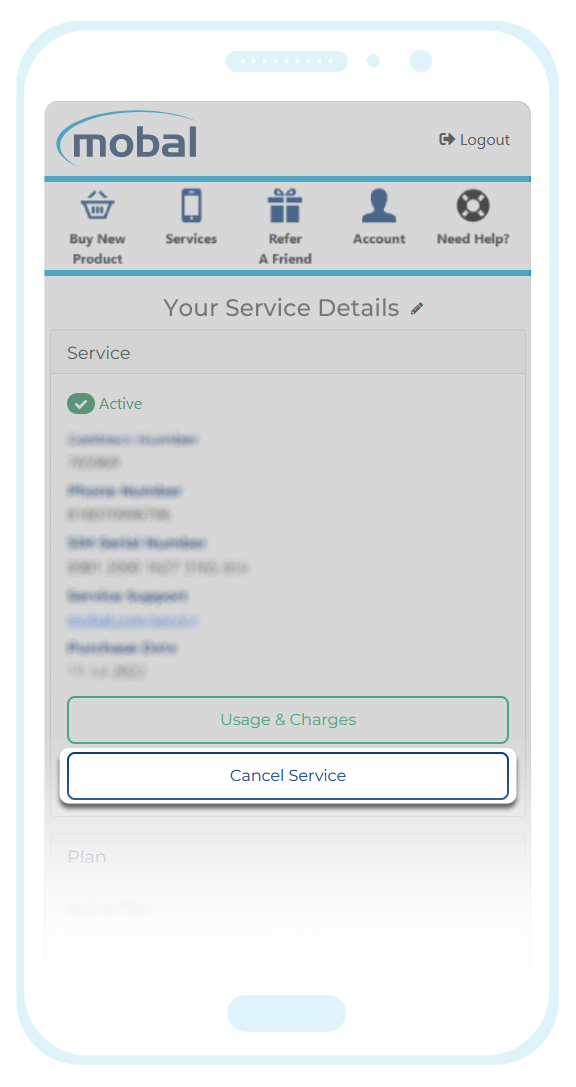
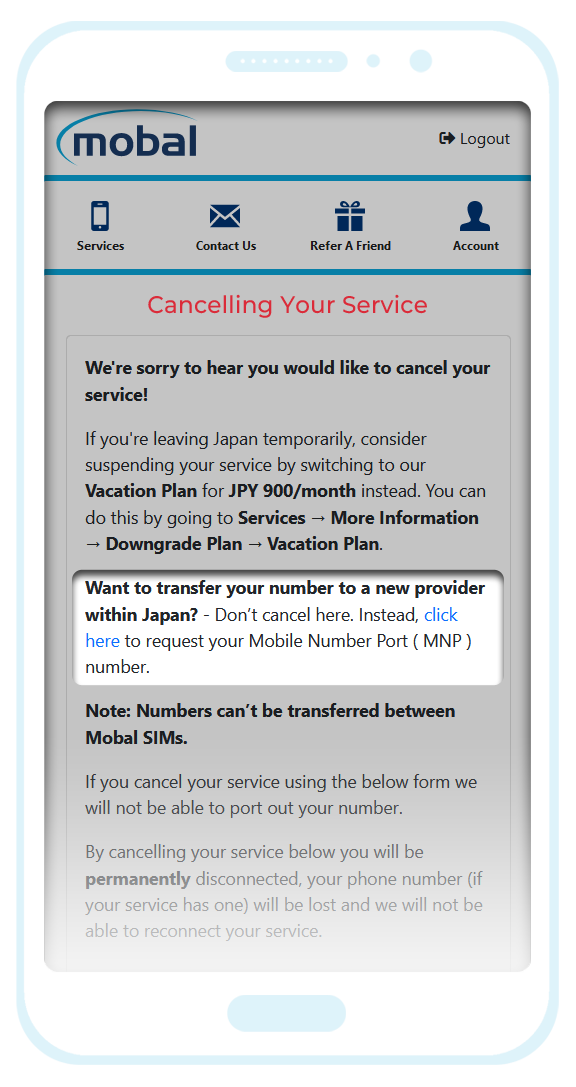
Instead you must to refer to the section at the top of the screen and click on the link (as highlighted in the image below) to load the number porting form.
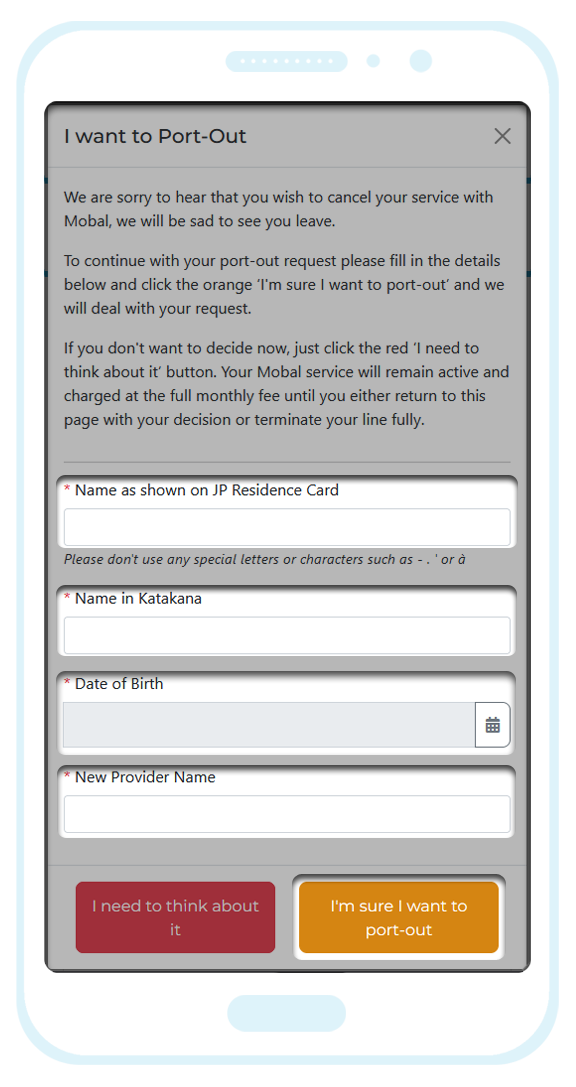
We will then send you the MNP details via email as soon as possible!
Important Note: Once you have received the MNP details from us, we would recommend that you pass this information on to your new service provider as soon as you can. Providers often operate on strict timelines for processing number porting requests and so if you pass this information on as soon as you have received it, this should hopefully prevent any issues.
Once your phone number has been fully ported and we have received confirmation (from your new service provider) that the number was successfully transferred, we will arrange for the Mobal plan to be manually terminated. As we will be arranging this for you, you will not be required to manually terminate your Mobal plan.
If your MNP request fails for any reason (and you need to request a new MNP code) however, please be advised that it will not be possible to request a new MNP code until the original code has expired. The expiry date of the MNP code will be displayed in the email notification you received containing the code.
If this article didn’t help, head back to the home page to see other solutions OR submit a support ticket using the button below.