If you have accidentally deleted your Mobal eSIM and require further assistance, please refer to the relevant guide below -
Voice+Data eSIMs / Voice Lite eSIMs
Click here for more information
If you have accidentally deleted your eSIM and require a re-issue, you can submit a request directly from your Mobal online account: www.mobal.com/myaccount
Once you have logged in to your account, please visit the "Services" section and then click on the "More Information" button next to the relevant eSIM.
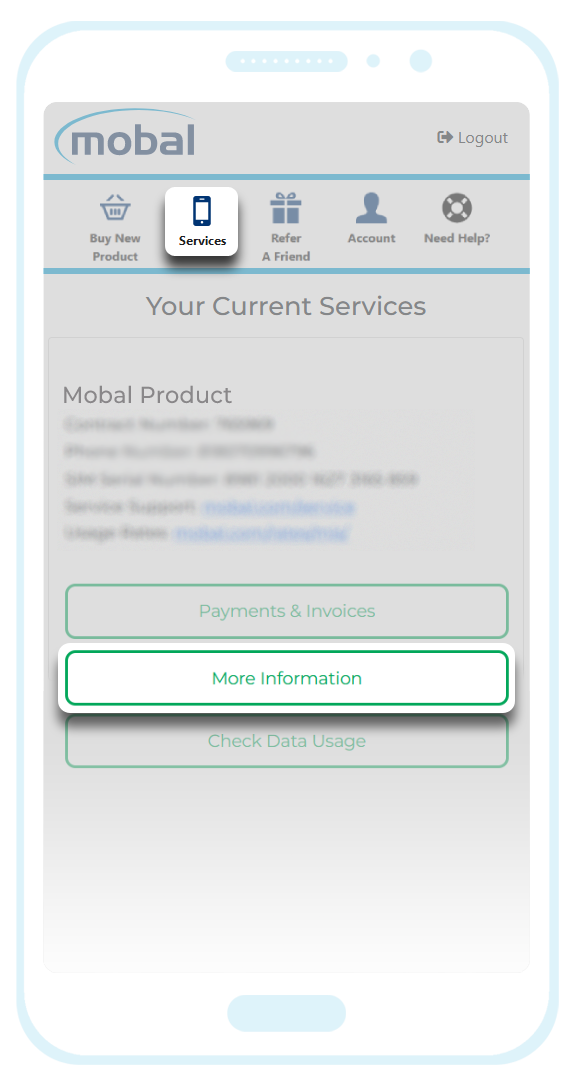
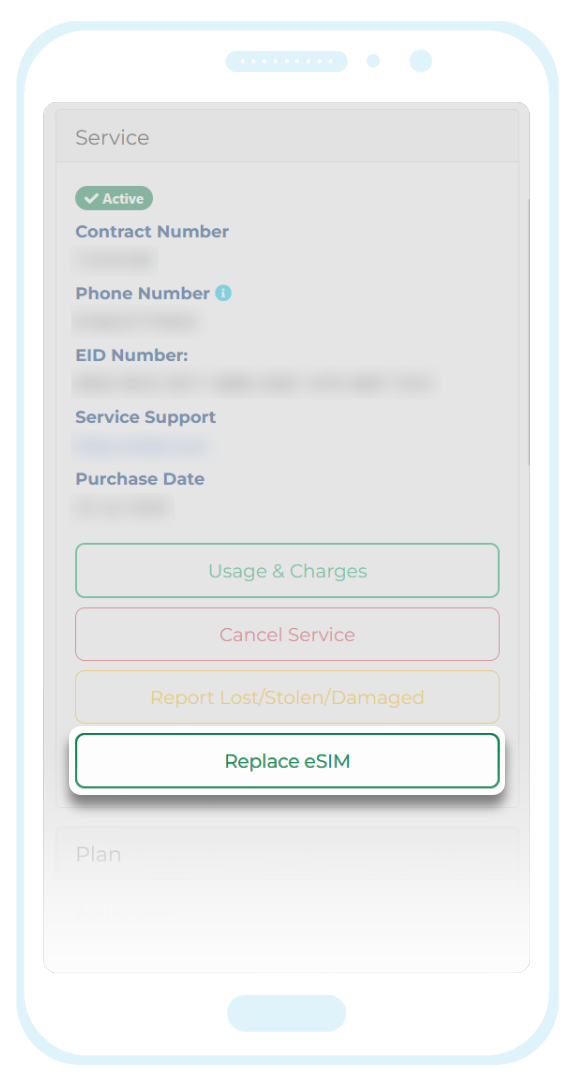
You can then follow the on-screen prompts to request a replacement eSIM.
If you are using a Voice+Data eSIM, you will be able to retain your current phone number when requesting the reissue. If you are using a Voice Lite eSIM however, it will not be possible to retain the current phone number and so if you request a replacement, it will be assigned a new phone number.
Once the eSIM has been successfully re-issued and is ready for installation again, you will receive a confirmation email.
Additional Note: Even if you are covered by the protection plan, you may still be charged a processing fee of ¥200 when requesting a replacement (as the process may fail if the charge is ¥0). If a ¥200 fee is processed however, we can confirm that this amount will be returned to you as an account credit (which will be deducted from your next bill).
5G Unlimited Data-Only eSIMs
Click here for more information
Our apologies but a "5G Unlimited Data-Only eSIM" cannot be reinstalled once it has been deleted.
This pre-paid product type is only suitable for one-time use and so if you have accidentally deleted the eSIM, it will not be possible to reinstall the eSIM or request a re-issue of the eSIM.
New orders can be placed directly from your Mobal account (MyAccount) by clicking on the "Buy New Product" button located at the top of your account.
5G Fixed Data-Only eSIM
Click here for more information
Orders placed after December 26th 2025
If you are using the latest version of our 5G Fixed Data-Only eSIM product (i.e. your order was placed after December 26th 2025) and the eSIM has been accidentally deleted, it should be possible to reinstall the eSIM.
To reinstall the eSIM, simply locate the "Your Mobal eSIM is ready!" confirmation email you initially received and install the eSIM again using the original installation details (such as the QR code or manual installation method).
If the confirmation email can no longer be found however, you can also retrieve the installation details directly from your Mobal account (MyAccount). Once you have logged in to your account, go to the "Services" section and click on the "eSIM Portal" button found next to your eSIM.
*Please note that it will only be possible to reinstall the eSIM on the same device. If you are now using a different device, you will be required to purchase another eSIM to replace the deleted eSIM (new orders can be placed directly from your account by clicking on the "Buy New Product" button).
Orders placed before December 26th 2025
If you are using the previous version of our Data-Only eSIM product (i.e. your order was placed before December 26th 2025) however, we regret to inform you that it will not be possible to reinstall the eSIM.
If the eSIM has been deleted and a replacement is needed, you would be required to place a new order.
New orders can be placed directly from your Mobal account (MyAccount) by clicking on the "Buy New Product" button located at the top of your account.
If this article didn’t help, head back to the home page to see other solutions OR submit a support ticket using the button below.